Conversion
More ways to make a CGA picture
Classic graphics, composite color, and character-based experiments, with optimization tailored to the selected mode.
Convert modern images into CGA graphics, preview the results, and export programs for DOS.
CGA Image Studio is a desktop image converter for classic CGA graphics, composite color, and text-mode experiments. Load an image, adjust its colors and dithering, and preview the conversion.
Supported modes can export a DOS .COM program, assembly source, or a bootable disk image. The standalone Windows build runs without a separate Python installation.
Conversion
Classic graphics, composite color, and character-based experiments, with optimization tailored to the selected mode.
From image to program
Supported modes export runnable programs, assembly source, and bootable disk images.
Demonstrated in MartyPC
The featured 640×200 output has been confirmed running in the emulator. Physical hardware testing remains separate.
The published Windows alpha is 0.167a, a snapshot of the current converter and rebuilt interface. It succeeds v0.3.0-alpha.3 under numbering based on the historical v167 development line.
The package includes the grouped RGB and composite modes, 640x200 Multicolor Composite conversion, whole-pixel automatic preview zoom, progress and cancellation controls, and checks that prevent exporting a conversion after its image or relevant settings have changed.
The source regression suite passed 48 tests, and the downloaded standalone executable passed its packaged-runtime smoke check. Selected examples have been reviewed in MartyPC; complete mode-by-mode and output validation remains underway.
This remains an alpha checkpoint on the way to 1.0 beta. The complete mode/output acceptance matrix, centered-mode display and exit behavior, Windows scaling and clean-machine qualification still need review.
Thin palette-boundary artifacts have been reported with aligned eight-write output on an IBM 5160 with a New CGA card using RGB. The SCOPE8 diagnostic is available to investigate them; physical-hardware results are pending.
Automatic whole-pixel preview zoom approximates CRT proportions to keep source pixels uniformly sized. Composite appearance also depends on the CGA revision and display. Emulator validation is not physical-hardware certification.
Continue reviewing retained modes and their supported exports in MartyPC, with user confirmation for each acceptance case, before the 1.0 beta milestone.
A walkthrough of CGA Image Studio and a slideshow of converted images is planned.
Select an image to view it at full size.
CGA Image Studio turns modern pictures into images an original CGA can display—from the familiar cyan, magenta and white look to composite pictures with a much wider range of apparent colors. The interesting part is finding a good image inside each mode’s particular limits.
The conversion process depends on the selected mode: choosing palettes and backgrounds, matching character patterns and attributes, searching composite output, or choosing palettes for different regions of a scanline. Scaling, color adjustment and dithering give you control over the result. The same photograph can become several very different CGA images.
Start with 320×200 four-color or 640×200 two-color graphics. Explore the available palette and background choices, including the tweaked red/cyan/white palette, and optimize the selection for the source image. Brightness, contrast and individual RGB adjustments help preserve the features that matter before conversion; ordered and error-diffusion dithering offer different ways to represent missing shades.
On CGA’s composite output, neighboring pixel patterns affect the colors a display produces. Studio includes the familiar 160×200 16-color composite approach and simulations for Old and New CGA, so conversion can account for the display method as well as the stored pixels.
The 0.167a alpha includes 640x200 Multicolor Composite: a bitmap search that evaluates the simulated NTSC result, including neighboring bits. It is separate from the text-composite modes. Error diffusion can run after each line or during candidate selection, providing a choice between conversion speed and the resulting image.
Text mode offers another set of building blocks: fixed character shapes, foreground colors and background colors. Studio explores 160×100 16-color graphics, character-constrained RGB pictures and HiColor shading, alongside the composite text families labeled 512 and 1024 Colors. Those labels describe pattern/color combinations; the number of distinct visible colors depends on the mode and display.
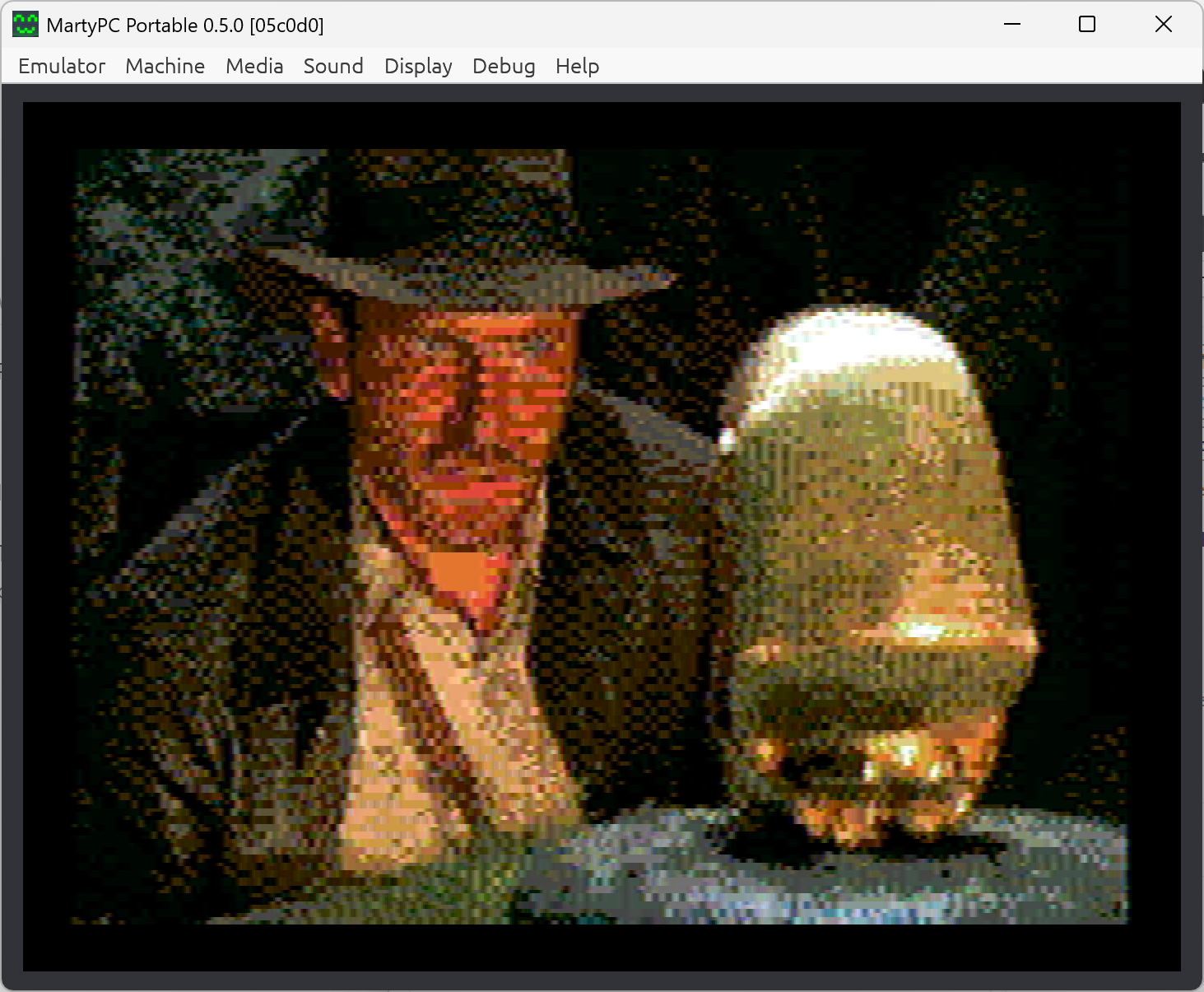
The 640×100 and full-screen 640×200 text-composite conversions search character patterns and colors against the simulated picture to retain finer detail. These are Studio’s explorations of techniques demonstrated by reenigne in the five-portrait image before the credits in 8088 MPH. Studio adapts that approach into an interactive conversion workflow. The Raiders example shows the full-screen approach running in MartyPC.
1K colours on CGA: How it’s doneThe 320×200 Mode Switch experiments keep the ordinary four-color bitmap but change its palette during display. One-write, eight-write and staggered eight-write options let different parts of the picture use different color choices. The staggered layout offsets the boundaries on alternating rows; the image itself stays still. Optional dither-aware optimization considers how the chosen palettes and dithering work together.
Load common image formats, adjust framing and color, convert, and inspect the result in the GUI. Save preview images, or use supported modes to export a DOS .COM program, matching assembly source, or a bootable disk image. That makes it possible to take an experiment out of the converter and see it running in an emulator or test it on the intended hardware.
The interface groups RGB graphics, composite modes and RGB text, shows settings relevant to the selected mode, and keeps advanced controls expandable. Output can be saved through one Export menu. A conversion must be completed again after changing its image or relevant settings; zooming the preview does not require reconversion.
Studio is still an alpha. Mode support and export behavior are being checked individually. Successful emulator output does not establish compatibility with every physical card.
Special thanks to reenigne for the CGA research, composite modeling and conversion work that this project draws on. His published techniques provide the foundation for Studio’s composite experiments.
Credit also belongs to VileR and the wider 8088 MPH team. Their discoveries, artwork and explanations made these techniques accessible to others. The linked write-ups explain the original work and are well worth reading alongside Studio’s experiments.
1K colours on CGA: How it’s doneCATCH-UP OVERVIEW · STATUS AS OF September 27, 2026
CGA Image Studio began on December 6, 2025 as CGA Converter, in a working folder called CGAFun. The earliest surviving version already had the core idea: load a modern picture, try the available CGA palettes and backgrounds, and find a useful conversion. It handled 320×200 four-color and 640×200 two-color graphics, with side-by-side previews, scaling, dithering and GIF output. Optimization was part of the project from the beginning.
The numbered versions show how quickly the experiments spread beyond those two modes. December’s work explored 160×100 graphics, character-shaped pictures and HiColor shading, while early Mode Switch experiments chose a palette for each scanline. The character modes went through several approaches as the converter took on the restrictions of actual character patterns. DOS program export followed, giving the images a route out of the preview window and onto a CGA display.
Composite output opened another direction. By the end of December, the saved versions included 160×200 composite conversion, a decoder credited in the code to reenigne, Old and New CGA simulation, and experiments based on the 1024-color text trick. The converter now had to consider how stored patterns would turn into color through the composite signal. That work draws directly on reenigne’s research and the techniques demonstrated by the 8088 MPH team.
By May 2026, the text-composite work was searching combinations of characters and colors for 640×100 pictures, then extending the approach to full-screen 640×200 output. The development notes show attention shifting to detail: retaining edges as well as average colors, controlling dithering, and revisiting the worst-fitting areas with an optional polish pass. Before-and-after comparison and background processing made those searches easier to evaluate. The current Raiders example belongs to this line of development, building on the photographic text-composite approach seen in 8088 MPH’s five-portrait image.
The working v165 application became the Git baseline in May. Until then, development had largely been preserved as successively numbered Python files; the repository established a place for commits, release versions and documentation. The later v167 work also made exported assembly readable and annotated, so a generated picture could be examined as a program as well as viewed as an image.
A major branch of the June work tackled changing palettes several times within a scanline. Each part of the picture could use a different four-color selection, but the display program had to place every change at the right point. The history records alignment diagnostics, measured boundaries, changes to the leading palette, and optimization that accounts for dithering. It settled on one-write and eight-write choices in the interface. Getting the preview and the running program to agree became a substantial part of the project.
That timing work required a correction. September’s investigation found that an earlier validation setup had omitted CPU wait states and the resulting refresh delays, allowing tests to pass while the running image was wrong. Those timing results were withdrawn, and the first standalone alpha kept eight-write exports disabled. A corrected timing implementation and stronger emulator checks led to their return in alpha.2, with the resulting picture confirmed in MartyPC. Alpha.3 then added a fixed staggered layout, moving palette boundaries between alternating rows to break up the vertical divisions.
As of September 27, 2026, CGA Image Studio had a downloadable Windows alpha and an active source version. Work beyond that package included a reorganized interface, further composite conversion, and checks of the individual text modes and their exports. The Raiders image shown here has been confirmed running in MartyPC. The next stage is to finish reviewing the complete workflow and qualify the timing-sensitive output on physical CGA hardware. The project has grown into a collection of ways to make pictures with CGA, with the conversion methods, working examples and remaining questions documented together.
2026-09-28 · 0.167a
CGA Image Studio 0.167a brings the recent conversion work into a new standalone Windows alpha. The interface now groups modes by display type, keeps advanced settings out of the way, and puts progress and a clear STOP button in the top bar. Automatic whole-pixel zoom makes fine patterns easier to inspect without uneven scaling.
The release includes 640x200 Multicolor Composite conversion, corrections to the 512-color text path and static text composite output, and a selectable Mini-Frames display duration. Exports now check that the current image and settings match a completed conversion.
The version number follows the historical v167 development line and succeeds alpha.3. This is a checkpoint toward 1.0 beta, with full mode/output validation still in progress. The download also includes the verified Raiders emulator example and a scope-test disk for investigating the reported eight-write edge artifacts on physical CGA hardware.
2026-09-27 · v0.3.0-alpha.3
The Windows prerelease adds a fixed staggered layout for eight-write Mode Switch conversion, with matching DOS program, assembly, and disk exports. It remains an alpha while feature and hardware validation continue.
Vintage Computer Federation Forums · June 2026 · Project discussion and hardware testing
Discussion of the converter’s palette-switching experiments, with hardware test results and timing feedback from VileR, GloriousCow and reenigne.
reenigne’s blog · 2015 · Foundational research and attribution
reenigne explains the composite text techniques, the portrait strip in 8088 MPH, and his approach to converting photographs.
VileR / int10h.org · 2015 · Background and original contributors
VileR’s illustrated explanation of how the RGB and composite text tricks combine, including the contributions behind the 8088 MPH color modes.
LATEST DEVELOPMENT DOCUMENTATION
Live from GitHub’s default branch. This may describe features newer than the downloadable release.
Open this tab to load the README.
Download Windows alpha - 0.167a — Standalone Windows x64 executable, Raiders demo, SCOPE8 diagnostic, checksums and release notes. No separate Python installation is needed; the executable is unsigned.
Source code on GitHub — Development source, documentation, and technical notes.
Comments
Questions, suggestions, or something you’ve tried with CGA Image Studio? Join the conversation.
Local preview: comments are saved only on this computer. Spam protection is simulated here.
Loading comments…
Elsewhere in the community
The original hardware-testing discussion continues on the Vintage Computer Federation Forums.
Join the forum discussion ↗Sharing a test result? Include your machine, graphics card, display type, and the Studio version and mode you used.